What Are Heatmaps, and How Can I Use Them in my Marketing?
Heatmaps visualize user behavior on your site, showing clicks, scrolls, and mouse movements. See how marketers visualize data using tools.

Heatmaps show user interactions on your website. They use color as a visual representation to highlight where people click, scroll, or move their mouse, making it easy to spot what grabs attention and what doesn’t. Marketers use this data, which is made up of multiple data points, for data analysis to improve layout, content, and conversions.
In this guide, you’ll learn what heatmaps are and how to use them effectively in your marketing strategy.
Key takeaways:
- Heatmaps visualize user interactions.
- They highlight what content users engage with most.
- Using heatmaps enables data-driven marketing decisions to increase user engagement and conversion rates.
Ready to see your funnel in action? Build with Convertri and analyze visitor behavior today.
What is a heatmap?
Heatmaps are a way to visualise complex data about how users interact with web pages. Heatmap services collect and interpret data from activities such as clicking, scrolling, and time spent on different parts of the page, and then translate that into an overlay which shows you what parts of your web page users interact with most and which they ignore. In other words, which are “hot” and which are “cold”.
Here’s an example of a heatmap from Hotjar.com:
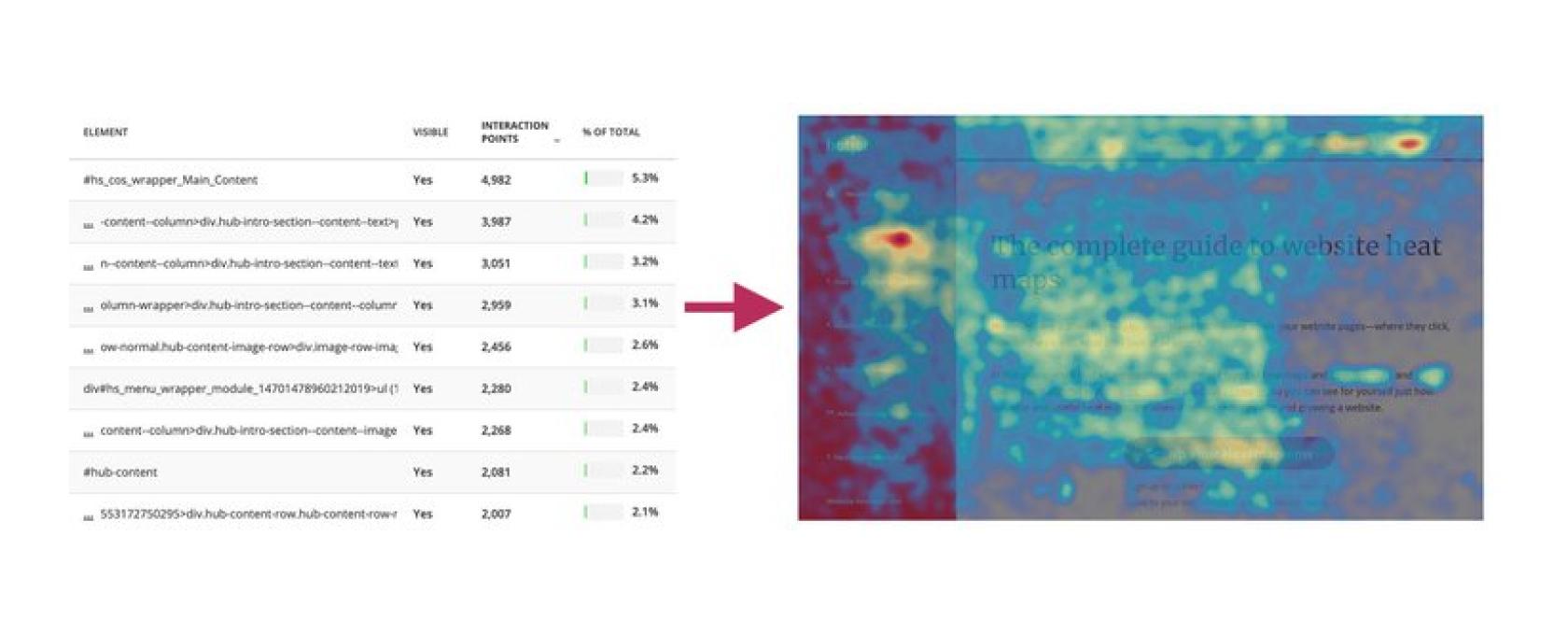
Here, you can see how the data in the left hand table is translated into an easily understandable overlay on the right. The two most interacted with links, represented in the red spots on the left and top right, are bright red. The rest of the page is yellow and green, showing that the next most interacted with area is the main text of the article.
History and evolution of heatmaps
Heatmaps date back to the late 1800s. They were first used in statistics to show data density with color. The term “heatmap” became popular in the 1990s as software made them easier to create. Early heatmaps were static and used in fields like weather tracking, finance, and research.
In web design, heatmaps gained traction in the early 2000s. Tools like Crazy Egg and Hotjar made it easy to track clicks, scrolls, and mouse movement. Before that, developers had to write code to track behavior.
Modern tools automate heatmaps and offer real-time data. Over time, they’ve become a must-have tool for improving user experience and boosting results.
Why marketers use heatmaps
Heatmaps give marketers a clear view of how people behave on a website. You can see what grabs attention, what gets ignored, and what needs fixing. Recent studies show that websites using these tools boost conversion rates by up to 30%.
Here’s how they help:
UX and conversion optimization
Want to know why people leave your site without buying or signing up? Heatmaps help you spot the problem.
You’ll see if users are clicking on the right buttons, finding your forms, or getting lost on the page.
If they scroll past your call-to-action or ignore key links, you’ll know. Then, you can tweak the layout for better conversions.
It’s a smarter way to test changes before guessing what works.
Content engagement analysis
Heatmaps show which parts of your content people actually read.
If visitors only stick around for the first paragraph, that’s a signal to break things up, add images, or improve your hook. You’ll also see which sections people interact with most—great for knowing what topics your audience cares about.
Think of it like real-time feedback without sending a single survey.
Identifying dead zones
Dead zones are parts of your page that get zero attention. Maybe it’s a banner no one clicks. Or a footer that never gets seen.
Heatmaps highlight these cold spots so you can remove or replace them with something useful. It helps you declutter the page and focus attention where it matters most.
Build high-converting funnels with Convertri and uncover visitor insights using powerful heatmaps.
How do heatmaps work?
You can’t see a heatmap for just any old website: it has to have a heatmapping tool installed. This lets the software start tracking the clicks and other activity it needs to gather the data.
The behavioral science behind this idea is that we move our mouse roughly in tandem with our eyes. Wherever we’re looking, our mouse usually follows. Therefore, heatmapping can be a reliable way of tracking not only where users interact, but also what they’re paying attention to.
But, advanced heatmapping tools are also now available for the big players which actually use a laptop’s camera to track eye movement. This means approximating behavior based off mouse activity is no longer needed – we can actually see where people are looking on the web page.
Due to the ethics of watching people through their laptop cameras and the relative newness of the technology, this isn’t a viable choice for most people. But it is an example of how powerful heatmapping can be.
Types of heatmaps
Most heatmapping tools for websites analyse mouse data. This includes:
Click Maps
Click maps show where your users are clicking. You’ll see “hot” zones where people click the most, like buttons, links, or images. They help you determine whether your calls-to-action (CTAs) are working or if users are clicking the wrong things.
Scroll Maps
Scroll maps show the extent to which users scroll down a page. They use color to show where most people stop reading. This helps you see if your content is too long or if important stuff is getting missed.
Move Maps
Move maps (also called hover maps) show where users move their mouse. While it doesn’t mean they’re looking exactly there, it gives a clue about where their attention might be. These maps are useful for understanding how users explore your page.
Eye-Tracking Heatmaps (optional)
These maps track where users are actually looking, not just moving or clicking. They require special hardware or tools, so they’re more advanced. Still, they offer deep insight into what catches users’ eyes first.
How do I use heatmaps in marketing?
Heatmapping tools give a twenty-thousand word marketing report in one easy to understand image. You literally have a roadmap to optimising your marketing campaigns because when you can see what your audience is interacting with and what they are ignoring, you can interpret that data into optimisation.
Take a look at the following image of an A/B test from Creatopy.com:
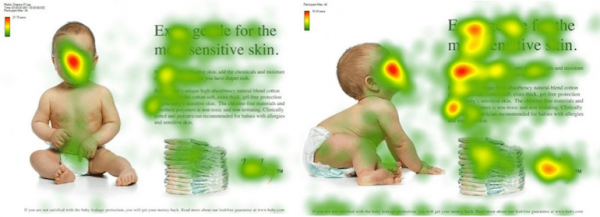
The image on the left is the original landing page. On the face of it, they seem to have followed all the marketing rules: have a human face, nice bold text, good copy, and a call to action. But as you can see, while nearly everyone looked at the baby, nobody went to click on the CTA.
What the marketers did to optimise this landing page was change the image – they kept the baby, but chose an image where it seemed to be looking at the text. And as you can see, it worked wonders.
The marketers noticed an opportunity to take advantage of another fact of behavioral science: that of Fitt’s Law, which, in simple terms, states that “people look where others are pointing”. No matter if an object is pointed to with the eyes, by touching the object, directing with the finger, an arrow, or with the gaze of others, it is an innate behavior of humans that works perfectly in advertising.
In other words, what is that baby looking at? Why is it so interesting? We must look, too!
You can see that the next red “heat” points after the baby’s face are the portions of text it’s directly looking at, and after that, the CTA text. It’s worth noting here that the marketers changed nothing about the copy or the other images: only where the baby was looking.
How to use heatmaps for funnels & landing pages
There are now quite a few heatmapping services available, such as those from Hotjar and Crazy Egg, which will help you monitor each visitor’s interactions with your site and find areas for improvement.
But even if you have the most detailed heatmaps on the planet, all of your marketing sweat is down the drain if you don’t know how to implement that information in the best way possible.
That’s why you should ask yourself the following questions when you get your heatmap:
- Where are visitors ignoring?
- Is my most important content being seen?
- Are people clicking key buttons? (CTA’s, form submits, etc)
- Are people confused by non-clickable elements?
- Are people getting distracted? If so, where?
Heatmaps are an incredibly powerful source of marketing data, if you have enough traffic to make them meaningful. They might just reveal a new strategy hiding in plain sight, or pay dividends in the form of page optimisation.
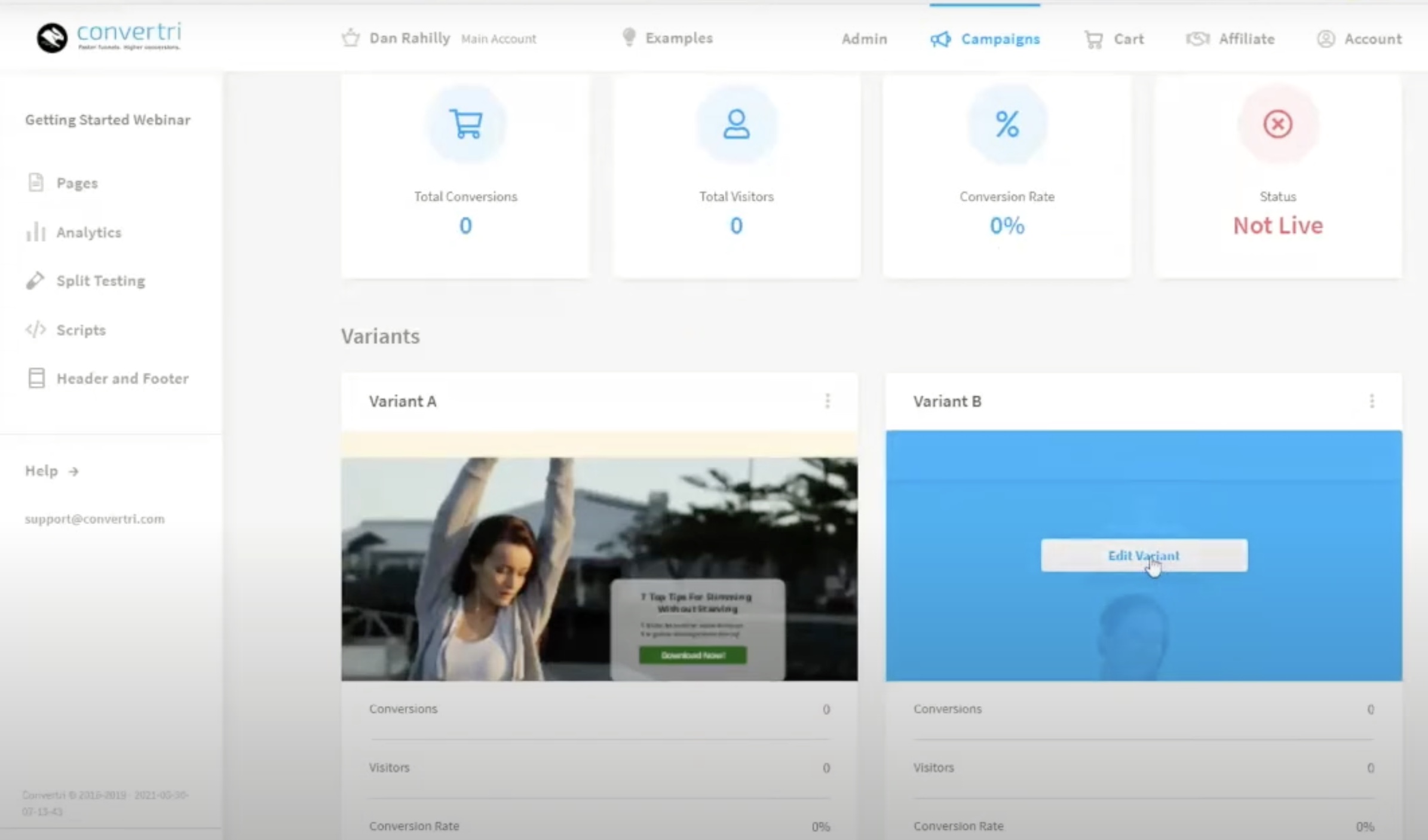
Pro Tip:Pair Convertri’s split testing feature with heatmaps for a full picture.
Example workflows with Convertri
Step-by-step example:
- Build your landing page in Convertri.
- Publish and integrate with a heatmap tool to collect user interaction data.
- Watch where users click, scroll, or rage-click.
- Use this data to analyze user behavior.
- Edit the layout based on insights.
- Run A/B tests and track conversion changes, helping you predict user behavior more accurately.
Common mistakes to avoid
- Ignoring scroll data – If users never see your CTA, they can’t click it.
- Overreacting to one session – Use heatmaps in context with analytics.
- Not testing changes – Always validate edits with A/B tests.
- Forgetting mobile – Mobile heatmaps can look totally different.
See exactly where your visitors engage and use heatmaps inside Convertri to optimize every funnel step.
Best heatmap tools for marketers
Here’s a quick comparison of the top heatmap tools in 2025:
| Tool | Pros | Cons |
| Hotjar | Easy to set up, great for behavior analytics | Limited free plan |
| Microsoft Clarity | 100% free, no traffic limits, session replays | Slightly less intuitive UI |
| Smartlook | Strong funnel analysis, mobile heatmaps included | Learning curve for beginners |
| Crazy Egg (Optional) | Fast setup, built-in A/B testing | Paid plans only |
FAQs about Heatmaps
What is a heatmap?
It’s a visual tool that shows where users click, scroll, or move their mouse on a page.
Do I need to code to use heatmaps?
No. Most tools (like Hotjar or Clarity) just need a small script added to your site. Convertri users can paste it in under “Page Scripts.”
Are heatmaps GDPR-compliant?
Yes, most tools anonymize data and let you disable recordings from certain regions.
Which heatmap tool works best with Convertri?
Hotjar and Microsoft Clarity are the easiest to integrate and offer strong insights for funnel testing.
Final Words
Heatmaps help marketers see how users interact with their sites. They show where visitors click, scroll, and move their mouse. This shows which content attracts attention and which is overlooked. With these insights, you can make changes to improve engagement and boost conversions.
Using heatmaps together with Convertri makes optimization easier. Convertri lets you build and test landing pages quickly. You can apply heatmap data, run A/B tests, and see what works best. This helps you create better funnels and pages that connect with your audience.
If you want to grow your business, start using heatmaps with Convertri today.